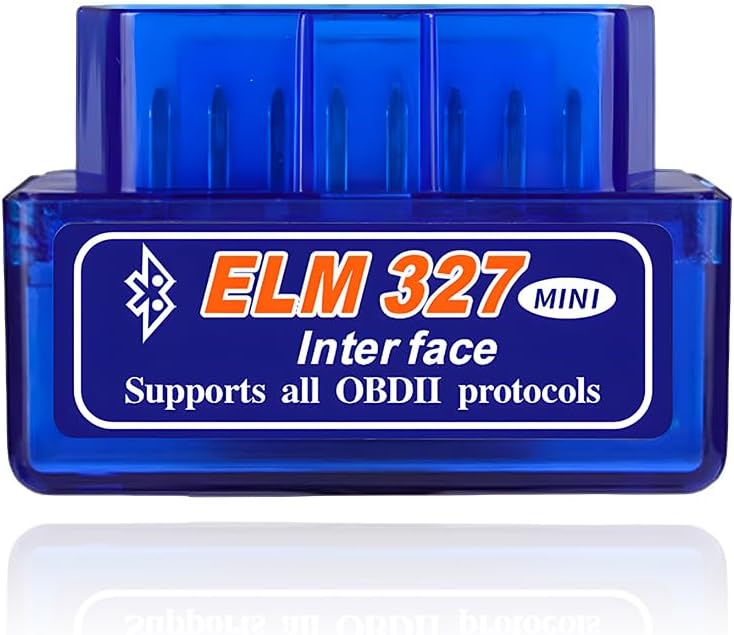
Best minis
Android ELM327 mini · V1.5 · PIC18F25K80

Super Mini ELM327 V1.5 (PIC18F25K80)

The mini that app forums keep recommending: a V1.5 super mini built on the PIC18F25K80, speaking Classic Bluetooth to Torque, Car Scanner and the pickier apps that stumble on v2.1 clones.

  • VersionELM327 V1.5 (clone)
  • ChipPIC18F25K80 on most variants
  • LinkClassic Bluetooth, Android
  • ProtocolsAll 9 OBD-II, plus J1939 and user CAN
  • FuelPetrol and diesel OBD-II cars
  • ColoursBlue or white
Pairs well with
  • Apps that reject a v2.1 clone's thinner command set
  • Android owners who want the chip named on the box
  • Older US cars on J1850 PWM or VPW
Skip it if
  • iPhone owners: a Classic Bluetooth mini never reaches iOS
  • Buyers who want a brand, a manual and a warranty
Open the deal
Colours & packs

Pick the chip variant

V1.5 on the PIC18F25K80: the command set apps expect

V1.5 is a number you will never find in Elm Electronics' own history. The Canadian company went from v1.4 straight to v2.0, so every V1.5 adapter is a clone. The label survives because clone makers attached it to boards that copy the older, fuller command set and run it on a Microchip PIC18F25K80.

That pairing of label and chip is why the super mini draws a loyal following. Many OBD apps were written against the v1.x command list, and they send setup commands a cheap v2.1 clone may simply ignore. A V1.5 on the PIC18F25K80 answers more of them, so the app gets past its initialisation and on to the data.

What V1.5 means in practice:

  • Fuller support for the AT commands apps use to set protocols, headers and CAN filters.
  • Fewer stalls on the ECU search in apps with advanced modes.
  • The same generic engine data as any other mini once connected.
  • No extra modules: ABS, airbag and body systems remain out of reach.

The full protocol list on this family is complete: SAE J1850 PWM at 41.6 kbaud and VPW at 10.4 kbaud, ISO 9141-2, ISO 14230-4 KWP with 5-baud and fast init, and ISO 15765-4 CAN in 11- or 29-bit form at 500 or 250 kbaud. The descriptions also list SAE J1939 and two user-set CAN modes, USER1 at 125 kbaud and USER2 at 50 kbaud.

Why J1850 matters: older US Fords used J1850 PWM and older GM cars J1850 VPW, before the US required CAN from model year 2008. Some minis skip those two; the super mini names both.

Descriptions also say it works with diesel OBD-II cars, which matches the complete protocol list.

Inside the shell

Chip, link and pins

SpecValue
Version labelV1.5 (clone firmware)
MicrocontrollerPIC18F25K80, named on most variants
Chip-free variantOne blue variant is marked without the PIC18F25K80
ConnectionClassic Bluetooth
DevicesAndroid phones and tablets
iPhone / iPadNot listed
App named in the titleTorque
OBD-II protocolsSAE J1850 PWM (41.6 kbaud), SAE J1850 VPW (10.4 kbaud), ISO 9141-2, ISO 14230-4 KWP (5-baud and fast init), ISO 15765-4 CAN (11/29-bit, 500/250 kbaud)
Extra CAN modesSAE J1939 (29-bit, 250 kbaud), USER1 CAN (11-bit, 125 kbaud), USER2 CAN (11-bit, 50 kbaud)
VehiclesOBD-II petrol and diesel cars
FunctionsRead generic and manufacturer-specific codes with meanings, clear codes, turn off the MIL
Code libraryOver 3,000 generic code definitions
Live dataRPM, load, coolant and intake temp, speed, fuel trims, manifold pressure, timing, air flow, throttle, O2 voltages, fuel pressure
ColoursBlue, white
In the box1 mini ELM327 Bluetooth adapter

Torque, Car Scanner and FORScan on the V1.5 super mini

The title of this super mini names one app: Torque. That is the natural first install on Android, and the V1.5 firmware gives it everything it asks for. DashCommand, Car Scanner and OBD Fusion follow the same Classic Bluetooth routine.

  1. Seat the super mini in the OBD-II socket, ignition on.
  2. Pair from the phone's Bluetooth settings. The device usually shows as OBDII or OBD2, and blue minis commonly use PIN 1234, with 0000 on some units.
  3. Open the app, choose Bluetooth, select the mini you paired, protocol on auto.
  4. Connect with the engine running for live data.

Which apps get the most from V1.5:

  • Torque Lite and Pro: gauges, logging and code reads, the app printed on the packaging.
  • Car Scanner: dashboards, readiness and code reads on the free tier.
  • FORScan: the Ford-focused program favours PIC18F25K80-based adapters. On a plain mini it reaches the high-speed CAN side; the medium-speed bus needs an adapter with a switch, which this mini does not claim.
  • OBD Fusion and DashCommand: live data and trip logging.
A V1.5 mini opens more of an app than a v2.1 clone does, but it cannot add hardware. Apps such as BimmerCode that ask for specific adapters stay closed to it.

Every variant is described for Android, and none names iOS or a Windows PC. The connection settings each phone app needs are covered under mini app setup, and the pairing order with PIN alternatives in the ELM327 mini manual.

Among the minis

Where it sits among the minis

ELM327 mini models by type, September 2026. Highlighted: Super Mini ELM327 V1.5 (PIC18F25K80).

White with the chip, blue without: telling super mini variants apart

The super mini is sold in a string of near-identical variants, and one detail separates them: whether the PIC18F25K80 is named. Most say it outright. A few leave the chip unmentioned, and one pair spells out the difference by colour.

VariantChip statementColour
V1.5 Super Mini (three styles)PIC18F25K80 namedBlue
V1.5 with PIC18F25K80 chipPIC18F25K80 namedBlue
V1.5 multi-car, whiteWith PIC18F25K80White
V1.5 multi-car, blueMarked without PIC18F25K80Blue
Mini V1.5 (two styles)Chip not namedBlue

That multi-car pair is the one to read carefully. Both carry V1.5 in the title, yet the blue one is labelled as having no PIC18F25K80, while the white one has it. If the chip is the reason you are buying, pick the white one or a variant that names the chip.

How to check what arrived:

  • Open the shell: the PIC18F25K80 marking is printed on the chip.
  • Run a checker app such as ELM327 Identifier, which tests which commands the adapter answers.
  • Watch for two stacked circuit boards, common on PIC-based clones.
A V1.5 title on its own proves little: some super minis sold as V1.5 describe an ELM327 V2.1 processor inside. Treat an unnamed variant as unknown until it passes a command check, and choose a chip-named one when V1.5 behaviour matters.

A command check matters more than the colour of the plastic. A variant that answers the full command list works like a V1.5, whatever its title says, and one that fails is a v2.1 clone in a V1.5 box. Test it inside the return window.

The variants share the rest: Classic Bluetooth, Android first, and the thumb-sized mini shell that sits flush under the dash.

Swap it for

Three other dongles

Branded V1.51 Panlong B02 Mini V1.5
Panlong B02 Mini V1.5
Panlong's B02 carries V1.5 in its model number, with nine protocols and a 1-year warranty.
  • Classic Bluetooth, PIN pairing
  • Android only, not for iPhone
  • Firmware v1.5
Open the deal
25K80 with iPhone support2 B02-KD Mini Bluetooth 5.1
B02-KD Mini Bluetooth 5.1
The B02-KD pairs a dual-board 25K80 chipset with Bluetooth 5.1 for iOS, Android and Windows.
  • Bluetooth 5.1: pairs inside the app
  • iPhone and Android
  • Torque, Car Scanner, OBD Fusion
Open the deal
Code reads for less3 Blue ELM327 Mini (V2.1 Clone)
Blue ELM327 Mini (V2.1 Clone)
The blue v2.1 mini pairs with PIN 1234 and runs Torque for plain check-engine reads.
  • Classic Bluetooth, PIN pairing
  • Android phones and tablets
  • Torque, Car Scanner, OBD Fusion
Open the deal

Super Mini V1.5 or a branded v1.5: Panlong B02 and B02-KD

The super mini is the generic route to V1.5 and a named chip. Two other minis cover the same ground with more paperwork: a branded Android mini with V1.5 printed in its model name, and a Bluetooth 5.1 mini built on a 25K80 chipset.

Super Mini V1.5Panlong B02 V1.5B02-KD
Chip namedPIC18F25K80Not statedDual-board 25K80
LinkClassic BluetoothBluetoothBluetooth 5.1
iPhoneNoNoYes
WarrantyNot stated1 yearDefects replaced

Choosing among them:

  • Android, lowest outlay, chip on the box: the super mini, in a chip-named variant.
  • Android with a brand behind it: the Panlong B02 V1.5.
  • An iPhone as well, same chip family: the B02-KD Bluetooth 5.1.
  • Plain code reads only: the blue v2.1 mini does that for less.

The generic route has a trade-off. The super mini comes with no manual worth the name and a short description, so the setup knowledge has to come from the app side. For owners comfortable with that, it delivers the chip and the version most apps are happiest with. For anyone who wants to email a maker when something fails, the branded Panlong is the calmer purchase.

For an iPhone household, neither Classic mini helps: the B02-KD brings the same 25K80 chip family to Bluetooth 5.1, where iOS apps can find it.

Tick three boxes first: the phone is Android, the car has an OBD-II port, and your chosen app is one that benefits from V1.5. Then choose a variant whose title names the PIC18F25K80, and run a command check the day it arrives.

Pairing Q&A

Setup questions

What does V1.5 mean on an ELM327 mini?

It is a clone label. Elm Electronics went from v1.4 to v2.0, and V1.5 adapters copy the older, fuller command set, usually on a PIC18F25K80.

Is the Super Mini V1.5 better than a v2.1 mini?

For apps that send advanced setup commands, usually yes. For plain code reads in Torque, both work.

Which apps work with the ELM327 mini V1.5?

Torque is named on the box. Car Scanner, OBD Fusion, DashCommand and FORScan on high-speed CAN also run on V1.5 minis.

How can I tell if my mini has the PIC18F25K80?

Open the shell and read the chip marking, or run a checker app such as ELM327 Identifier. Buy a variant that names the chip.

Does the Super Mini V1.5 work with an iPhone?

No. Its Classic Bluetooth radio is invisible to iOS apps. The B02-KD is the 25K80 option for iPhone.